
Call or Text Kearney 308-234-9335 | Hastings (402) 463-3456 | GI (308) 384-6939 | Lincoln (402) 483-6400
Facebook
LinkedIn
YouTube
Instagram
  • About Us
    • Return Policy
    • Authorized Apple Government Discount Program
    • Employment
    • Contact Us
    • Customer Portal
  • Repairs
    • iPhone Repair
    • Mac Repair
    • iPad & iPod Repair
    • Lenovo Repair
    • Apple Watch Repair
    • Beats & More Repair
    • AppleCare
    • General Repair Request
  • Services
    • Care+ Unlimited Tech Support
    • One-on-One Tech Training
    • Data Recovery Services
    • Electronic Recycling
    • Trade-In Program
  • Products
    • Apple
    • Lenovo
    • Sonos
    • Original HP Ink and Toner
    • Pre-Owned / Close Outs
  • Education
    • Education Website
    • ESU Repair Request
    • Submit a Device Repair Request
    • K-12 BuyBack
  • Resources
    • Blog
    • How to Turn Off ‘Find My Device’
  • Locations
    • Kearney
    • Hastings
    • Grand Island
    • Lincoln
  • Appointments

The Fastest Ways to Switch between Virtual Screens on Your Mac

April 23, 2018Apple, MacKelsey Jezbera

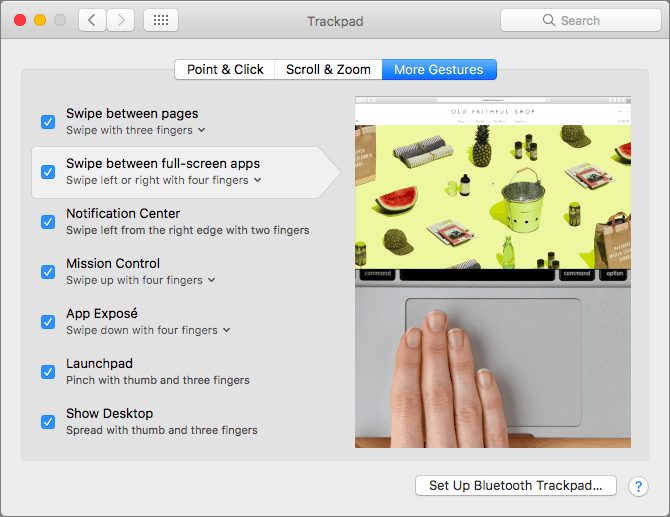
When you click the green zoom button in a window on your Mac, that puts the window into full-screen mode. It’s a great way to maximize screen real estate on a smaller MacBook screen, for instance, but how can you switch between these virtual screens quickly? You could swipe up on the trackpad with four fingers and then click the icon representing the desired screen in Mission Control, but that’s pokey. Instead, swipe left or right with four fingers to hop between screens. Don’t have (or like using) a trackpad? You can keep your fingers on the keyboard by pressing Control-Left arrow or Control-Right arrow.
Leave a Reply Cancel reply

Your email address will not be published. Required fields are marked *

Recent Posts

  • Keep Sensitive Data Private by Disabling AI Training Options
  • When to Trust AI Tech Answers (And When to Call Us)
  • Follow This Advice Before Switching to a New iPhone 17
  • Apple Unveils New iPhone 17 Lineup, Updated Apple Watches, and AirPods Pro 3
  • Blood Oxygen Monitoring Returns to Recent US Apple Watches with Software Updates

Categories

Archives

Facebook
Twitter
LinkedIn
YouTube
Instagram

Kearney

2315 2nd Ave
Kearney, NE 68847

308-234-9335

308-234-9335

Hastings

1001 W 2nd St
Hastings, NE 68901

402-463-3456

402-463-3456

Grand Island

2720 Old Fair Rd
Grand Island, NE 68803

308-384-6939

308-384-6939

Lincoln

235 S 70th St Ste 101
Lincoln, NE 68510

402-483-6400

402-483-6400

Questions? Contact Us Now!

Contact Us

Home

About Us

  • Return Policy
  • Privacy Policy
  • Financing
  • Employment
  • Contact Us
  • Customer Portal

Repairs

  • iPhone Repair
  • Mac Repair
  • iPad & iPod Repair
  • Lenovo Repair
  • Apple Watch Repair
  • Beats & More Repair
  • AppleCare
  • General Repair Request

Services

  • Care+ Unlimited Tech Support
  • One-on-One Tech Training
  • Data Recovery Services
  • Electronic Recycling
  • Trade-In Program
  • Remote Tech Support

Products

  • Apple
  • Lenovo
  • Sonos
  • Original HP Ink and Toner
  • Pre-owned Inventory

Resources

  • Blog
  • How to Turn Off ‘Find My Device’
  • Education Resources
  • Donations

Copyright © 2022 Computer Hardware.

Powered by web design kearney, ne